TriggerFlo icon
TriggerFlo icon

TriggerFlo

A focused always-on-top time tracker and Kanban task manager for people who want to stay in flow and actually finish things.
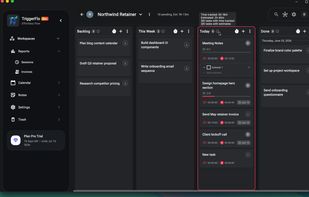
Kanban board with a live timer running on the active task

Cost / License

  • Freemium (Pay once or Subscription)
  • Proprietary

Application type

Platforms

  • Windows
  • Mac
  • Linux  We are not yet on the Linux app store. We have .tar.gz and .deb files only.
  • iPhone
  • iPad
  • Android
  • Android Wear
  • Apple Watch
  • Online
  • Software as a Service (SaaS)
1like
0articles

Features

Properties

  1.  Lightweight
  2.  Distraction-free
  3.  Support for Themes
  4.  AI-Powered

Features

  1.  Calendar Integration
  2.  Task Time Tracking
  3.  Recurring Tasks
  4.  Reminders
  5.  Kanban Board
  6. Google Calendar icon  Sync with Google Calendar
  7.  Subtasks
  8.  Goal Tracking
  9.  Support for MarkDown
  10.  Full-Text Search
  11.  Encrypted Backup
  12.  Pomodoro Timer
  13.  No Coding Required
  14.  Ad-free
  15.  Dark Mode
  16.  Calendar View
  17.  Cloud Sync
  18.  Goal Setting
  19.  Billing & Invoicing
  20.  On top
  21.  Team Collaboration

TriggerFlo News & Activities

Highlights All activities

Recent activities

TriggerFlo information

  • Developed by

    US flagTriggerFlo
  • Licensing

    Proprietary and Freemium product.
  • Pricing

    One time purchase that costs up to $35, and / or subscription ranging between $3 and $23 per month + free version with limited functionality.
  • Alternatives

    96 alternatives listed
  • Badge

    Get an embeddable badge for TriggerFlo
  • Supported Languages

    • English
    • Spanish

AlternativeTo Categories

Office & ProductivityBusiness & CommerceRemote Work & EducationBackup & Sync

Apple AppStore

  •   Updated 
  •   0 avg rating
TriggerFlo was added to AlternativeTo by triggerflo on and this page was last updated .
No comments or reviews, maybe you want to be first?

Official Links

What is TriggerFlo?

TriggerFlo is a time tracker and Kanban board built around a single idea: the timer and the board are the same tool. Every card carries its own estimate, tracked time, and due date, so starting a task starts the clock on it. A floating, always-on-top timer keeps the current task visible without holding a window, and hovering a board column shows how much work is left in it.

Tracked time rolls up into reports and client invoices. Pick a project, a client, and an hourly rate, and TriggerFlo builds the line items from the hours you actually tracked, down to the subtask — trim what you don't want to bill, then export a PDF or CSV.

Other features include a calendar that merges scheduled tasks with your Google Calendar events, a Spotify integration that starts your focus playlist when the timer starts, subtasks, descriptions, comments, reminders, estimates and due dates on every card, global search across all projects, an editable session history for the timers you forgot to stop, timezone-aware tracking and reporting, and deep per-project customization with gradients, images, and icons.

Teams can share a board, assign tasks to each other, and publish a project as a public read-only page.

An AI assistant named "Flo" is in development and will soon guide you on creating tasks, analyzing your day, and completing tasks with AI models you are already subscribed to.

TriggerFlo is multi-platform; it runs on Windows, macOS, Linux, iOS, Android, and the web, with companion apps for Apple Watch and Wear OS. It is free forever for up to three projects, with a Pro tier available monthly, yearly, or as a one-time lifetime purchase.

