


FuseBase Capture
33 likes
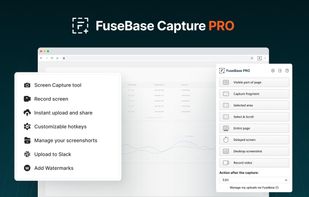
Capture full and partial screenshots, record screen or webcam videos with extensive editing tools, including annotations, video conversion to gif/mp4, and sharing options. Create step-by-step guides enhanced by AI, save in multiple formats, and utilize cloud storage integration.

Cost / License
- Freemium (Subscription)
- Proprietary
Application type
Platforms
- Online
- Microsoft Edge
- Google Chrome
- Opera
- Mozilla Firefox


Features

FuseBase Capture News & Activities
Highlights All activities
Recent News
No news, maybe you know any news worth sharing?
Share a News TipRecent activities
 Mustafa-6478 added FuseBase Capture as alternative to VidShrink
 MUZEEBURRAHAMAN added FuseBase Capture as alternative to GoFully
 PB2025 added FuseBase Capture as alternative to FullGrab
 c17s5qhu added FuseBase Capture as alternative to Zipline Android
 Benoks added FuseBase Capture as alternative to EShot
 Dmitry2026 added FuseBase Capture as alternative to Capture Full Page - Screenshot Editor
- tooaverage added FuseBase Capture as alternative to Foldout Screenshot
 Mysdes added FuseBase Capture as alternative to Frset
 Danilo_Venom added FuseBase Capture as alternative to ChillShot AI
 amith added FuseBase Capture as alternative to OmniCapt


Featured in Lists

A list with 807 apps by AmileyaRyver without a description.
List by AmileyaRyver with 807 apps, updated

A list with 144 apps by Nemets39 without a description.
List by Nemets39 with 144 apps, updated

A list with 56 apps by trishafhhmoam without a description.
List by Trisha Hoque with 56 apps, updated
What is FuseBase Capture?
FuseBase Capture information
Developed by
 Nimbus Web, Inc
 Licensing
Proprietary and Freemium product.Pricing
Subscription that costs $5 per month + free version with limited functionality.Rating
Average rating of 3.3Alternatives
192 alternatives listedBadge
Get an embeddable badge for FuseBase CaptureSupported Languages


Comments and Reviews
As title description above
Its kind of like shareX, but it supports video recording and webm format It has its own dedicated hosting platform so you don't bootleg off imgur
Its like youtube, in the sense you can share webm format videos to people which is convenient (Screencasts with audio, similar to mp4 style)
Its like evernote with its folder / tag structures but faster and better
paid service lets you have large upload limits ($5/month)
I have only tried it for like 10 minutes though, it seems like there's video previewing on the servers, but you cannot manage the URL links generated in your notetaking application which is kind of stupid
Its the same thing as evernote notes
Its worse than shareX because shareX gets the job done way faster, but its better that there's longer video uploads and can share it like youtube links and tag image links
Its better than snagit from techsmith
Also worse than shareX in the sense I cannot choose who my image / file host will be. I don't like being tied down to somebody else's server that I do not chose. I like being able to choose the fastest servers (images with imgur, amazonS3 for files) out there.
I might use it purely for making .webm format screencasts, youtube-ish style
EDIT A day Later..
I decided that I really don't like this software, despite all its pros. I have compared it to shareX and evernote since that its basically a hybrid clone of both.
WEB TECHNOLOGIES: It runs on a combination of Ruby, NodeJS, angularJS, with its website based in PHP
WHAT I WOULD USE IT FOR MAYBE:
PROS vs ShareX
CONS vs ShareX
PROS vs Evernote
CONS vs EVERNOTE
I'll have to look into this over the span of a week to really see if I want to use this program or not.
[Edited by Kagerjay, February 27]
[Edited by Kagerjay, February 27]
[Edited by Kagerjay, February 27]
[Edited by Kagerjay, February 27]
The good • Lots of features • Easy to use
The bad • Potentially not secure. Because the code is not available publicly. So it can not be review by the public. In other words, there is a risk of abuse. Such as recording screenshots and videos of your private life without your consent. • It is own by a for-profit corporation called "Nimbus Web Inc". It is not owned by a not-for-profit community. Usually a corporation first priority is to hoard money. Not serve you and protect your privacy.
~Revisiting May 2025: In basic/free, great fast way to make shareable link to captured image. Just capture w/icon click, click Google (I have Google set to default in pull-down) Click the 3 dots (note it might scroll through the page, but captures what you chose) Click Quick Upload and a link is generated. ~Note that Send to Google Drive, Dropbox, Watermarking or pdf is paid/pro. Edit will let you crop, etc. The "Action after capture" pulldown menu is only partially effective in Basic, but you need it set to Edit to be able to choose Edit. I've had mixed luck with the scrolling capture. ~Has a Note-keeper similar to using EverNote.. and they really keep your stuff! I probably hadn't signed on in years and my notes are still there! ~Paid vs Free/Basic options cause some confusion.. sometimes there's a pop-up telling you, but the pulldown "Action after Caption" may confuse.
its like shareX with an image gallery to tag things with built in, but on chrome. Couldn't get audio mic recording to work though
Next, brain surgery.