




Partitions
4 likes
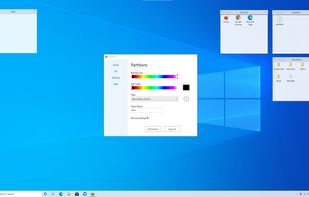
Organize and declutter your desktop by creating containers of icons and shortcuts or add multiple explorer windows right on your desktop.

Cost / License
- Freemium (Pay once)
- Proprietary
Platforms
- Windows


Features
Partitions News & Activities
Highlights All activities
Recent activities
 pidock added Partitions as alternative to piDock
 deskripple added Partitions as alternative to DeskRipple
 the_Libre_one added Partitions as alternative to Deskepty
 MetalPhoenix added Partitions as alternative to Shortcutty
- muhammed83 liked Partitions
 POX added Partitions as alternative to Milee Grida
 KnightRlex added Partitions as alternative to WFolder
Partitions is a much more simplified program than iTop Easy Desktop . Basically, it lets you set up new named folders, with a color background window on desktop that acts as a portal/shortcut to that folder. Simple can be better, but you are more limited in options in background color and transparency. Without shading, I find the colors garish. Folders are kept by default in the program's choice of location vs a place of your choice. It appears,...
 POX added Partitions as alternative to DeskSweep
 ForeverFlying added Partitions as alternative to Desktop Frames +


Partitions information
Developed by
Chan Software SolutionsLicensing
Proprietary and Freemium product.Pricing
One time purchase (perpetual license) ranging between $4 and $5 + free version with limited functionality.Alternatives
20 alternatives listedBadge
Get an embeddable badge for PartitionsSupported Languages


Comments and Reviews
Partitions is a much more simplified program than iTop Easy Desktop . Basically, it lets you set up new named folders, with a color background window on desktop that acts as a portal/shortcut to that folder. Simple can be better, but you are more limited in options in background color and transparency. Without shading, I find the colors garish. Folders are kept by default in the program's choice of location vs a place of your choice. It appears, however, that you can move the folder/portal.
"Partitions" are folder windows (no automatic grouping of desktop icons), similar to Portals - you have to keep taking new shortcuts from the desktop to the folders when software updates and adds the shortcuts again.
On latest Windows 11 updated to the day:
On the upside, when you double-click inside these "partitions" (let's call them containers) on a subfolder, it switches (opens into view) to that one inside that container, so that's a nice way of organizing many icons (especially since it will stay like that for the Windows session).
Another upside is the looks - the "partitions"/windows are a streamlined yet modern style, with translucency.