


StackEdit
91 likes
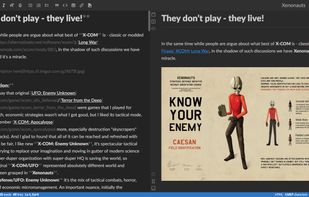
Full-featured, open-source Markdown editor based on PageDown, the Markdown library used by Stack Overflow and the other Stack Exchange sites.

 EU
EUPlatforms
- Online
- Chrome OS
- Google Chrome

Discontinued
The latest version (5.14.0) was released in July 2019.

Features


StackEdit News & Activities
Highlights All activities
Recent News
No news, maybe you know any news worth sharing?
Share a News TipRecent activities
 mattneri added StackEdit as alternative to TypeBreeze
 glance added StackEdit as alternative to Glance – Markdown Viewer
- sredfred liked StackEdit







Featured in Lists

Master List of all Apps and Software I use for both work and personal life.
List by Jimmy Briggs with 416 apps, updated

A list with 62 apps by xlin without a description.
List by C.A. with 62 apps, updated

A list with 568 apps by AmileyaRyver without a description.
List by AmileyaRyver with 568 apps, updated
What is StackEdit?
StackEdit information
Developed by
 Benoit Schweblin
 Licensing
Open Source (Apache-2.0) and Free product.Written in
Rating
Average rating of 4.5Alternatives
90 alternatives listedBadge
Get an embeddable badge for StackEditSupported Languages

AlternativeTo Category
Office & ProductivityGitHub repository
- 23,099 Stars
- 2,810 Forks
- 732 Open Issues
- Updated


Comments and Reviews
Simple, fast, in-browser, syncs with Google, GitHub, etc. Awesome.
StackEdit 5 became a little worst then 4 version: You need use CouchDB, GitHub, GitLab, Google Drive account to sync workspaces, JSON export now affects only files. It's so inconvenient when you're clearing browser storage:(
[Edited by M_O_Z_G, October 03]
Are you saying that this software is only operable by programmers? And not ordinary mortals who might be being addressed as the Git(Hub) on the Couch(DB)?
;P
Probably my favorite editor for writing latex among other tools like Overleaf
Also has a really nice highlighting syntax that I really like using Anki cards with after
==operators. So I can figure out what to makeAlso, has a really nice notation for doing citations, really useful if you do research papers with things like Citation Machine
Has support for markdown
code snippets tooI used this previously a few years back and its improved a lot since then. The author merged his other Classeur app with this one
I use this with PhraseExpress so I can write math formulas faster than I can by hand, works pretty well too.
I think I might use this as my do all my course notes
I like that its still mostly markdown format so I can just dump my notes in github if I wanted too, and use a latex to image processor
[Edited by Kagerjay, May 04]
[Edited by Kagerjay, May 04]
[Edited by Kagerjay, May 04]
[Edited by Kagerjay, May 04]
[Edited by Kagerjay, May 04]
I like the ability to see my MD rendered on the side in a simplistic interface. I can push my blog posts directly to Blogspot. It saves drafts of my files in my google drive.