Apps with 'productivity' feature Page 2 of 76

All apps in Apps with 'productivity' feature category. Use the filters below to narrow down your search. 
Copy a direct link to this comment to your clipboard
  1. Tab Display icon
     15 likes

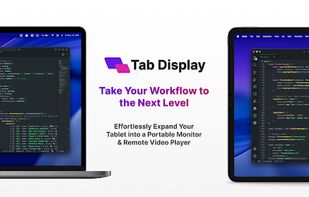
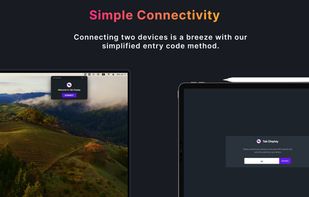
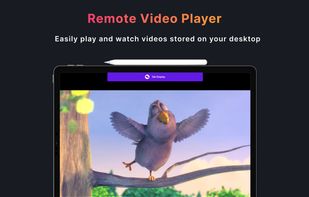
    Cross-platform second-screen and remote video player for Mac/Windows: use Android tablets, iPhones, and iPads for extended displays, supported window mirroring, screen sharing, and multi-monitor workflows over Wi-Fi or supported wired connections.

    Cost / License

    • Freemium
    • Proprietary

    Application type

    Platforms

    • Mac
    • Windows
    • Android
    • iPhone
    • Android Tablet
    • iPad
    • Global
    Tab Display screenshot 1
    Tab Display screenshot 1
    Tab Display screenshot 2
    +4
    Tab Display screenshot 3
    16 alternatives
  2. DeskDash icon
     4 likes

    DeskDash turns your Windows desktop background into a live dashboard of widgets that sit behind your open windows. Build your own or install from a secure community-based marketplace.

    Cost / License

    • Paid
    • Proprietary

    Platforms

    • Windows
    • RO flagRomania
    • European Union flagEU
    DeskDash screenshot 1
    DeskDash screenshot 1
    DeskDash screenshot 2
    +2
    DeskDash screenshot 3
    24 alternatives
  3. PrintScreen.ly is a desktop-first screenshot and screen recording app for macOS and Windows with a synchronized web dashboard. Capture region, window, fullscreen, or entire scrolling pages with pixel precision.

    Cost / License

    • Freemium
    • Proprietary

    Application type

    Platforms

    • Mac
    • Windows
    • Linux
    • Online
    • US flagUnited States
    Capture Options
    Copy Image Characters
    PrintScreen.ly Editing Tool
    +1
    PrintScreen.ly
    11 alternatives
  4. xTiles icon
     15 likes

    Manage tasks and projects seamlessly with a platform that captures ideas, plans goals, and collaborates easily, integrating with Google Calendar.

    Cost / License

    • Freemium
    • Proprietary

    Application type

    Platforms

    • Mac
    • Windows
    • Android
    • iPhone
    • iPad
    • Google Chrome
    • Software as a Service (SaaS)
    • UA flagUkraine
    xTiles screenshot 1
    xTiles screenshot 1
    xTiles screenshot 2
    +3
    xTiles screenshot 3
    45 alternatives
  5. #Pad icon
     5 likes

    Desktop notepad app for Windows and macOS, organizes text files with #tags, features task management, regex search, Python plugin support, and clipboard history.

    Cost / License

    • Paid
    • Proprietary

    Application type

    Platforms

    • Mac
    • Windows
    • PL flagPoland
    • European Union flagEU
    #Pad screenshot 1
    #Pad screenshot 1
    #Pad screenshot 2
    17 alternatives
  6. Capd icon
     6 likes

    Private macOS app to save web pages, notes, images, and links locally with fast full-text search, no account, no subscription, and no cloud storage.

    Cost / License

    • Free
    • Open Source (MIT)

    Application type

    Platforms

    • Mac
    • GB flagUnited Kingdom
    Capd search window
    8 alternatives
  7. ScreenTally icon
     5 likes

    Tracks app and website usage locally on Android and Chrome, with per-app alerts, focus mode schedules, zero ads, no cloud sync, and no account required.

    Cost / License

    • Free
    • Proprietary

    Application type

    Platforms

    • Android
    • Google Chrome
    • US flagUnited States
    Dashboard showing 53 minutes of screen time today — 44% of a 2-hour daily limit — with top apps ranked: Instagram 25m, TikTok 18m, Facebook 9m.
    Per-app detail for Instagram: 25 minutes, 7 sessions, 7-minute longest session, with an hourly usage chart and a live alert notification offering to pause or snooze.
    Two smart alert notifications on a phone screen — one warning that the daily limit is close, one showing Instagram at 20 minutes — nudging before you hit your limit.
    78 alternatives
  8. Calebar icon
     3 likes

    Calebar is a fast, friendly calendar that lives in your Mac menu bar. Click the date, a clean month slides open, jump to any day, then snap back to today in one click. No Dock icon, no window to manage, no notifications or badges, just a calendar exactly when you reach for it.

    Cost / License

    • Paid
    • Proprietary

    Application type

    Platforms

    • Mac
    • US flagUnited States
    Calebar screenshot 1
    5 alternatives
  9. Grow the life you want. Grove helps you nurture your bad habits, track your consistency, and visualize the progress through procedurally generated fractal trees that thrive as you do. Whether you're building new habits or want a way to visualize your daily growth, Grove...

    Cost / License

    Application type

    Platforms

    • Android
    • CH flagSwitzerland
    GroveResurrect screenshot 1
    GroveResurrect screenshot 2
    GroveResurrect screenshot 3
    55 alternatives
  10. Amplenote icon
     24 likes

    Amplenote allows you to take notes and link those notes to functional task and contacts lists for seamless project management. It supports integration with Google and Outlook calendars to schedule tasks and allows e-mail integration as well.

    Cost / License

    • Freemium
    • Proprietary

    Application type

    Platforms

    • Online
    • Android
    • iPhone
    • Android Tablet
    • iPad
    • Google Chrome
    • Firefox
    • US flagUnited States
    Capture your ideas using Jots Mode!

Jots are Daily Notes that we automatically create for you.
    Consolidate your best ideas using Notes Mode.

Notes can be shared for collaboration or published to the web in under 3 clicks.
    Turn your ideas into action using Tasks Mode.

Our task scoring algorithm suggests what to work on next, nested tags lets you zoom in on any project that's important to you right now.
    +21
    Block out your time and get things done using the Calendar Mode.

Syncs with your favorite external calendars biderectionally.
    153 alternatives
  11. Mindful Guard icon
     3 likes

    Android app blocker using UsageStats API for real-time, offline blocking without VPN, telemetry, or accounts; includes Strict Mode, custom timers, and scheduling.

    Cost / License

    • Freemium
    • Proprietary

    Application type

    Platforms

    • Android
    Choose exactly which apps to block — Instagram, TikTok, YouTube, Reddit, Facebook, and more — then confirm and start a focus session in seconds.
    Start a focus session with a simple timer. Once it's running, blocked apps stay blocked — no reminders to ignore, no loopholes, no way to sneak back in.
    Reel Guard sets session and daily limits specifically on Reels and TikTok, so you can stay mindful of short-form video without blocking the whole app outright.
    18 alternatives
  12. Donut Browser icon
     5 likes

    Open source anti-detect browser with unlimited isolated profiles, no telemetry, Chromium and Firefox engines, proxy and VPN support, and REST API access.

    Cost / License

    Application type

    Platforms

    • Mac
    • Windows
    • Linux
    • US flagUnited States
    Donut Browser screenshot 1
    42 alternatives
  13. Chunk icon
     8 likes

    Time blocking app for Mac that lives in your menu bar, with two-way Google, Outlook and Apple Calendar sync. Pay once, no subscription.

    Cost / License

    • Paid
    • Proprietary

    Application type

    Platforms

    • Mac
    • FR flagFrance
    • European Union flagEU
    Chunk screenshot 1
    Chunk screenshot 1
    Chunk screenshot 2
    +2
    Chunk screenshot 3
    155 alternatives
  14. DEV Community icon
     30 likes

    Where programmers share ideas and help each other grow. It is an online community for sharing and discovering great ideas, having debates, and making friends. Anyone can share articles, questions, discussions, etc. as long as they have the rights to the words they are sharing.

    Cost / License

    Platforms

    • Online
    • Android
    • iPhone
    • US flagUnited States
    Website
    293 alternatives
  15. AutoZoom icon
     6 likes

    AI screen recorder offering native Windows and macOS support, automatic zoom, motion blur, 3D effects, captions, webcam overlays, keystroke highlights, and rapid 4K exporting.

    Cost / License

    • Paid
    • Proprietary

    Application type

    Platforms

    • Mac
    • Windows
    • BD flagBangladesh
    AutoZoom screenshot 1
    52 alternatives
  16. TypingGym icon
     6 likes

    Boost your typing skills with TypingGim - practice with words, articles, or code examples. The app adapts to your skill level and helps you improve speed and accuracy.

    Cost / License

    • Free
    • Proprietary

    Application type

    Platforms

    • Online
    Words
    Article
    Code
    45 alternatives
  17. Dropover icon
     7 likes

    Dropover is a macOS utility that makes Drag and Drop easier. Use it to stash, gather or move any draggable content without having to open side-by-side windows.

    Cost / License

    • Paid
    • Proprietary

    Application type

    Platforms

    • Mac
    Dropover screenshot 1
    Dropover screenshot 1
    Dropover screenshot 2
    +2
    Dropover screenshot 3
    20 alternatives
  18. Lispr icon
     7 likes

    Free push-to-talk voice-to-text app for Mac and Windows that types what you say in roughly 99 languages, with no account required.

    Cost / License

    • Free
    • Proprietary

    Platforms

    • Mac
    • Windows
    • US flagUnited States
    Talk. It types itself in any language.
    Lispr types it for you in any app where your cursor is.
    Every dictation is saved. Look it up in the history.
    +3
    Lispr transcribes about 99 languages and translate 32.
    77 alternatives